What is System Design? A Complete Guide with Definition, Concepts, and Examples
If you have ever wondered “what is system design”, you are not alone. It is one of the most searched topics among software engineers, computer science students, and product teams. System design is the process of defining the architecture, components, modules, interfaces, and data flow of a system to satisfy specific requirements. This guide breaks down the system design definition, core concepts, real examples, and a beginner-friendly path to help you learn system design from scratch.
Whether you are preparing for a technical interview, building a scalable application, or simply curious about how large platforms like Netflix or Amazon handle millions of users, this article covers everything you need in one place.
What is System Design? (Definition)
System design is the blueprint-creation process for building software or hardware systems that are reliable, scalable, and maintainable. It involves translating business requirements into a technical architecture that specifies how different components interact, how data is stored, and how the system behaves under load. In short, system design answers the question: how do we build something that works well today and scales tomorrow?
System Design Definition Explained
At its core, the system design definition covers two layers: high-level design (HLD) and low-level design (LLD). HLD focuses on the overall architecture, such as servers, databases, and communication between services. LLD zooms into individual components, detailing classes, functions, and database schemas. Together, they form a complete plan that developers follow to build a functional, efficient, and maintainable system from start to finish.
Why System Design Matters
System design matters because poorly planned systems break under real-world pressure. A system that works fine for 100 users might crash with 100,000 users if scalability wasn't considered upfront. Good system design prevents downtime, reduces technical debt, and saves companies significant money. It also plays a huge role in technical interviews at companies like Google, Amazon, and Microsoft, where candidates are tested on their ability to design scalable systems from scratch.
System Design Basics
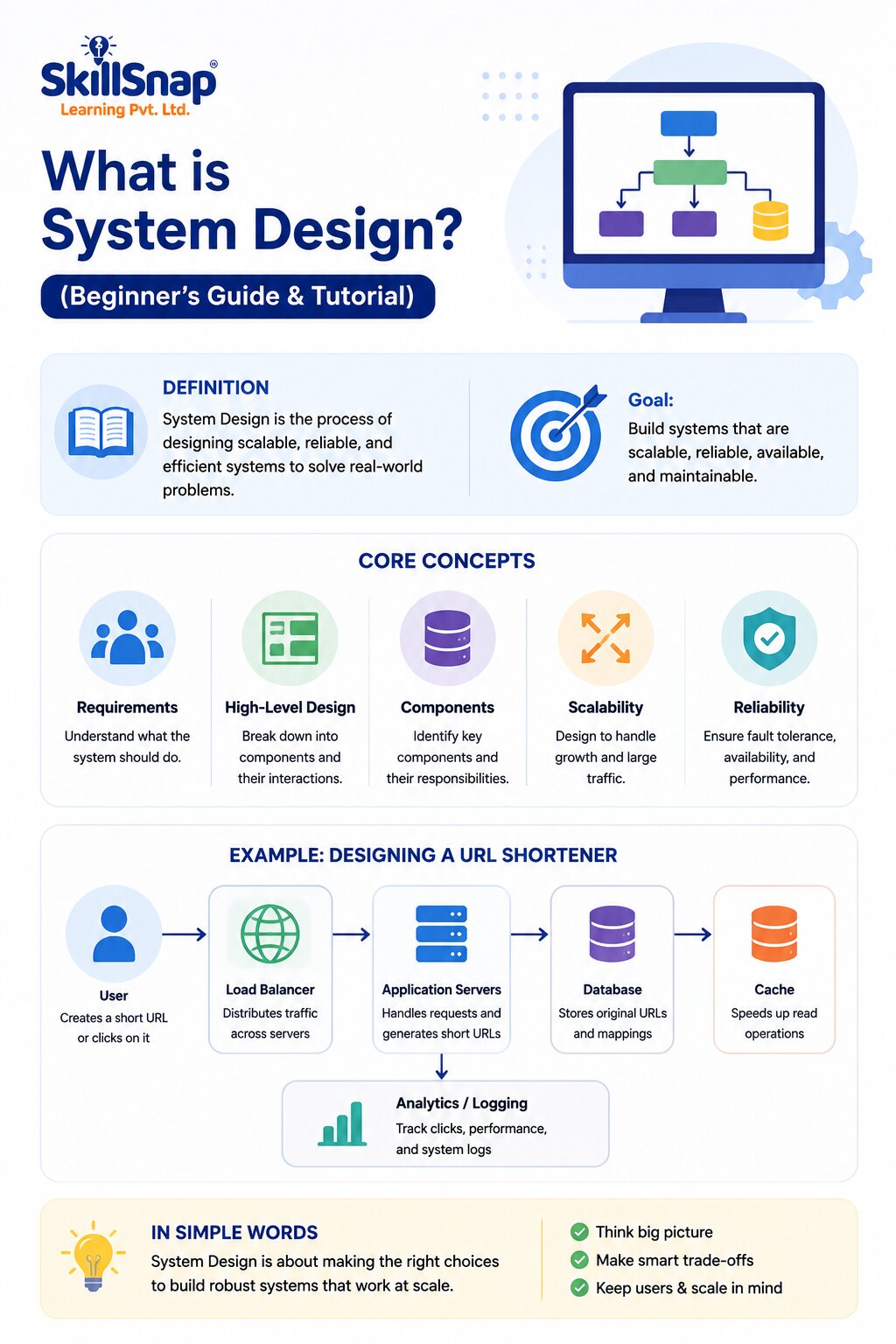
Before diving into advanced concepts, it helps to understand the system design basics that form the foundation of every architecture decision. These basics include scalability, reliability, availability, consistency, and performance. Every system design decision usually involves trade-offs between these factors. For example, improving consistency might reduce availability, and vice versa. Understanding these basics helps you evaluate design choices logically instead of guessing.
Basic Concept | What It Means | Why It Matters |
Scalability | Ability to handle increased load | Prevents crashes during traffic spikes |
Reliability | System works correctly over time | Builds user trust |
Availability | System remains accessible | Reduces downtime |
Consistency | All users see the same data | Avoids confusion and errors |
Latency | Time taken to respond to a request | Impacts user experience |
Core System Design Concepts
Once you understand the basics, the next step is learning core system design concepts that appear in almost every architecture discussion. These include load balancing, caching, database sharding, replication, message queues, and microservices. Each concept solves a specific problem, whether it's distributing traffic evenly, speeding up data retrieval, or splitting a large database into manageable pieces. Mastering these concepts is essential for designing systems that perform well at scale.
Concept | Purpose | Common Tools/Examples |
Load Balancing | Distributes traffic across servers | NGINX, HAProxy, AWS ELB |
Caching | Speeds up data access | Redis, Memcached |
Database Sharding | Splits large databases | MongoDB, Cassandra |
Message Queues | Handles async communication | Kafka, RabbitMQ |
Microservices | Breaks the app into independent services | Docker, Kubernetes |
CDN | Delivers content faster globally | Cloudflare, Akamai |
High-Level Design vs Low-Level Design
System design is generally divided into two categories, and understanding both is crucial for building complete architectures. High-level design (HLD) describes the system from a bird's-eye view, covering major components and their interactions. Low-level design (LLD) dives into implementation details like class diagrams, database schemas, and algorithms. Both layers work together: HLD sets the direction, while LLD ensures each part is built correctly and efficiently.
Aspect | High-Level Design | Low-Level Design |
Focus | Overall architecture | Component-level implementation |
Audience | Architects, managers | Developers |
Output | Architecture diagrams | Class diagrams, pseudocode |
Example | Use a load balancer and a cache layer | Design the cache eviction algorithm |
System Design Examples
Learning through real system design examples makes abstract concepts much easier to understand. Below are a few commonly discussed examples used in interviews and real-world engineering, each highlighting different design challenges like scalability, storage optimisation, and real-time communication.
Example 1: Designing a URL Shortener
A URL shortener like Bitly takes a long URL and converts it into a short, unique code. The design challenge involves generating unique short codes efficiently, storing millions of mappings in a database, and redirecting users quickly. Key considerations include choosing between hash-based and counter-based ID generation, database indexing for fast lookups, and caching frequently accessed links to reduce database load.

Example 2: Designing a Chat Application
A chat application like WhatsApp requires real-time message delivery, message storage, and support for group conversations. Designers must consider using WebSockets for real-time communication, message queues for reliability, and database replication to prevent data loss. Additional challenges include handling offline users, message ordering, and end-to-end encryption, all while maintaining low latency across millions of simultaneous conversations globally.
Example 3: Designing an E-Commerce System
An e-commerce platform like Amazon must handle product catalogues, inventory management, payments, and order processing simultaneously. This requires a microservices architecture where each function, such as search, cart, and payment, runs independently. Load balancing, caching product data, and ensuring transactional consistency during checkout are critical design decisions that directly impact user experience and business revenue.
System Design Tutorial: A Step-by-Step Approach
Approaching a system design problem systematically makes the process far less overwhelming. This simple system design tutorial framework works for interviews and real projects alike, guiding you from requirements to a working architecture in a structured, repeatable way.
Clarify Requirements: Understand functional and non-functional needs.
Estimate Scale: Calculate expected users, traffic, and storage.
Define APIs: Outline how components communicate.
Design Data Models: Plan database schemas and relationships.
Choose Architecture: Decide between monolith and microservices.
Add Scalability Layers: Introduce caching, load balancing, and replication.
Review Trade-Offs: Discuss consistency vs availability decisions.
How to Learn System Design (Beginner to Advanced)
If you want to learn system design effectively, start with the fundamentals before jumping into complex architectures. Begin by understanding networking basics, databases, and how the web works. Then move to core concepts like load balancing and caching. Practice by designing simple systems first, such as a URL shortener, before attempting complex ones like designing Netflix or Uber. Consistent practice and reviewing real-world architectures accelerate the learning curve significantly.
Learning Stage | Focus Area | Suggested Practice |
Beginner | Networking, databases, APIs | Build small CRUD apps |
Intermediate | Caching, load balancing, queues | Design a URL shortener |
Advanced | Microservices, distributed systems | Design Netflix, Uber, WhatsApp |
Common Mistakes to Avoid in System Design
Many beginners jump straight into technology choices without clarifying requirements first, leading to over-engineered or mismatched solutions. Other common mistakes include ignoring scalability until it becomes a problem, neglecting failure handling, and choosing a database type without considering the data access pattern. Avoiding these mistakes early saves significant rework and helps produce cleaner, more efficient system architectures from the very beginning.
Conclusion
Understanding “what is system design” is essential whether you're a software engineer, a computer science student, or simply someone curious about how large-scale applications work. From basic concepts like scalability and caching to real-world examples like designing a chat application or an e-commerce platform, system design combines logical thinking with practical engineering knowledge. Start with the basics, practice consistently, and you'll steadily build the skills needed to design robust, scalable systems. Visit SkillSnap Learning to learn Coding and AI Tools or join our Coding course.